Contents
Field Guide · 16 of 18
Convoys
Share a live map with a group, hand off stops, send a one-tap need to everyone, and answer who's asking to join — from the road or from the car.

A convoy is a live, shared drive — a group on the same map, with a roster, a place to talk, and shared stops, that ends the moment everyone's actually home.
In the RALLIER app
To start one, name it and choose who can see you. Convoy visibility is the default and the floor — only your active members ever see an exact position. Turn on Show my club where we are and your club also sees a coarse position, precise to about the size of a parking lot rather than a house. Turn on Let people find this convoy and choose My club or Anyone, and the convoy shows up in other members' Find list — though finding it only lets somebody ask to join, never see anyone's position until the lead says yes. You can also show your car on your own marker. On iOS this is the Start a convoy screen; on Android it's the Start tab of Driver mode.
Joining works two ways: type the six-character code into Join convoy, or find a public or club convoy under Find and tap Ask to join — the lead sees the request and approves or declines it. Share the code as plain text or read it out loud.
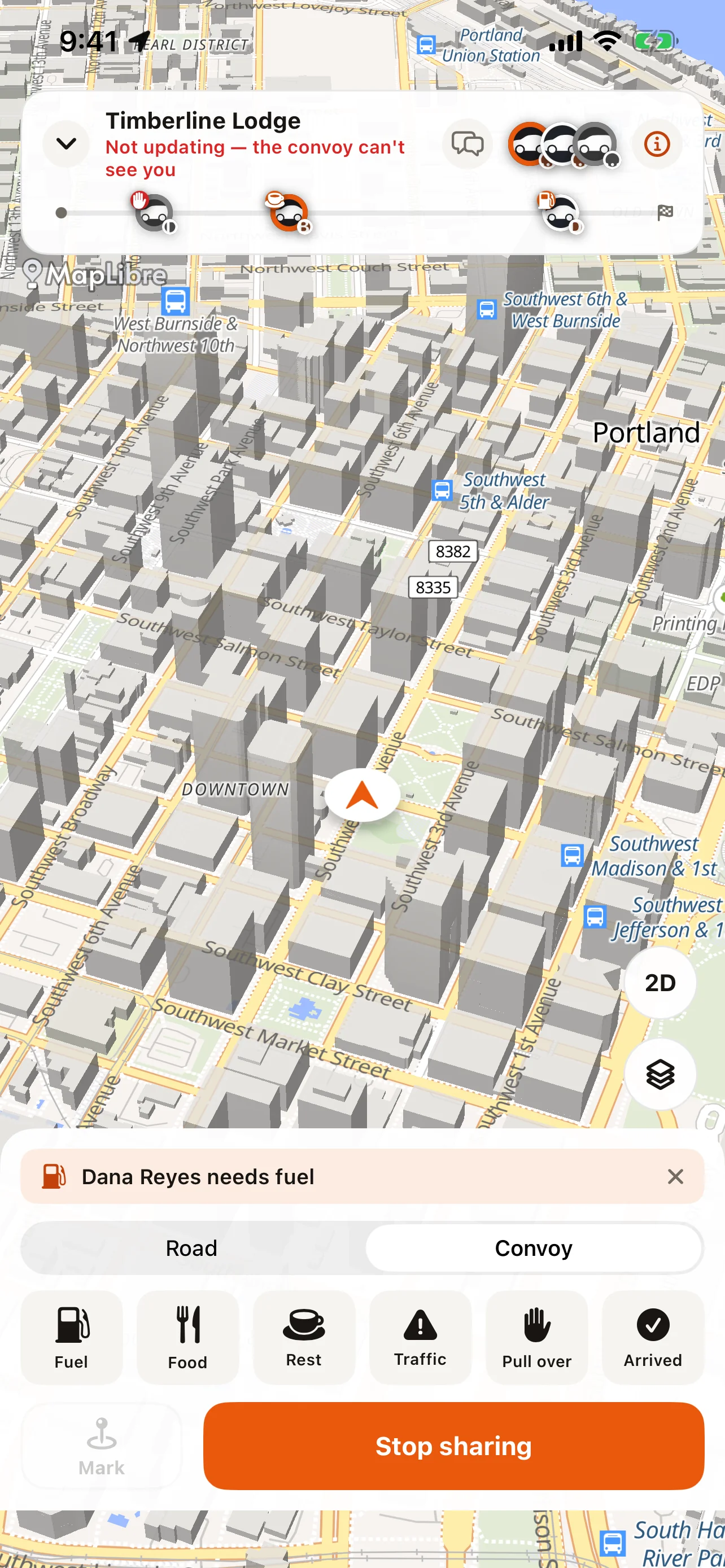
Every convoy has a lead, who sets the route, admits members, and can end the drive for everyone; a lead can also name one member sweep, so the group has a visible marker for who's running at the back. Everyone else is just a member. The roster shows the invite code, everyone's exact position, any pending join requests, and the convoy's shared stops — the lead can drop one at the current location for fuel, food, rest, or the finish, so the group can navigate to it independently.
Need something from the group? One tap sends Fuel, Food, Rest, Traffic, Pull over, or Arrived to everyone at once, and it also lands in the convoy's chat thread so there's a record of who asked and when. The chat itself is a normal thread — leave it for a passenger to use, and let the one-tap alerts do the talking while you're driving.
A convoy runs for up to four hours, with a warning and the chance to add time before it ends, and it also ends on its own if the group sits still for fifteen minutes. Leaving is a tap for one person; ending it for everyone is the lead's call. If the convoy was headed to an event and you actually arrive, sharing stops itself — your live position is deleted the moment you arrive; only the miles and the passport stamp the drive earned are kept.
CarPlay carries convoy setup into the car too: choose your club and car and start or join without touching your phone. Joining by code still needs the phone — typing six characters isn't something the car's screen is built for.
For turn-by-turn guidance the whole group follows, point the convoy at a saved route — see Routes, pins, and the passport. Without one, a convoy still shares stops and positions; the group just navigates to each other independently, the way you would to any shared pin.
On the web
Convoys run in the app and the car, not the web — but what a convoy earns shows up afterward on your Roam page: miles on the odometer, experience toward your level, and any new region the drive carried you into.
Tips
- Set a home location before your first convoy — RALLIER won't start or let you join one without it.
- Name a sweep on a bigger group so the lead can find the back of the pack at a glance.
- Discoverability is off by default. Turn it on only for the convoy you actually want strangers finding.
- Set the convoy up, mount your phone, and get everyone's roles sorted before you pull out — the roster, chat, and stop list are all built to be read at a glance, not typed into, once you're moving.